Showing posts with label universe. Show all posts

Monday, 22 October 2012

Aggregate Awareness in Universe


Lets see what is this aggregate awareness functionality and how it is useful in universe.
Lets say I have two tables customer and daily fact  with below data:


If I create the report of customers daily sales, it will join customer and daily fact table using cid column and will give me 24 rows of data.
But if my requirement is to create only quarterly sales or just monthly sales than the data will still traverse through 24 rows of daily fact table.
For eg.  Monthly sales will give me 12 rows of data while quarterly will be 4 rows of data. But this is still getting data from detail fact which has 24 rows, which if hold million facts can slow down the performance.
So we create materialised views or summary tables in our database for better performance.
And I created monthly and quarterly fact in my sample database. Below are the aggregated tables that I can use in my universe.


Now, the question is, we have aggregate tables but how to use the same in my universe based on user queries dynamically.
Aggregate awareness functionality will help me in achieving the same.
It is a two step process:
1    Use aggregate aware function in objects that needs to be made aggregate aware.
      Setting incompatibilities of objects with tables in aggregate navigation section.


Below is the structure of my universe now:


Now, I have made time dimensions i.e. Sales Dt, Sales Month and Sales Qtr and measue Sales as aggregate aware.
Aggregate function has syntax like:

@Aggregate_Aware(sum(aggregate table1),...,sum(aggregate tableN)) Defines a measure object using precalculated aggregate tables.

 Where table1 is highly aggregated(in our case quarterly fact),........and tableN is the least aggregate or    detailed one(in our case daily fact)


If you observe the definition in the select statement of Sales measure here, it is from highly aggregated table to detail one , same is done for the dimension table as well.


Now month is present in only two tables, hence only monthly and daily fact is used.


Sales Qtr object, quarter is present in all three fact tables; hence all the three are used.


We have used aggregate function in these tables, so we hope that system automatically will decide which table to refer dynamically, when a user selects or tries to run a query.
That means if user wants daily data than daily fact should be used, if monthly than monthly fact or if quarterly sales than quarterly fact.

Now, we have to set the incompatibilities.
This is done from Aggregate Navigation section under tools, in menu bar.
We have to make objects incompatible to tables.
For eg. Sales dt is incompatible to quarter and months table, similarly Sales month object is incompatible to quarter table.
You have to click the table and check the box in front of object to make it incompatible with the selected table.


Lets see how the queries behave, when you select different set of objects:
Scenario 1:
I selected customer name and sales, and if you see the below query , it is behaving same as the one i expect it, as it is taking data from quarterly fact table.


Scenario 2:  I added sales month object to it, and will remove quarter object.(it should only now point to monthly facts)


And if you observe, it is now using monthly facts only.

Scenario3:  Using sales dt object.


This also worked correctly.
Note: if aggregate navigation have not been used than the measure sales will always point to quarterly fact, even if you use sales dt object in your query, which is wrong behavior.
Also it is required to link aggregate fact to dimension tables, else it would fetch Cartesian product for table which are not joined. In efashion universe the aggregate table are not joined to other because the table itself has all the dimension objects, which is not always the case. In real time aggregate fact will hold aggregate measures and foreign keys of dimension table only, that is why it has to be joined to dimension tables.

Hope this article helps in better understanding of this feature.....
Forgive me for the typo's........




Tuesday, 20 March 2012

Advanced Join Property


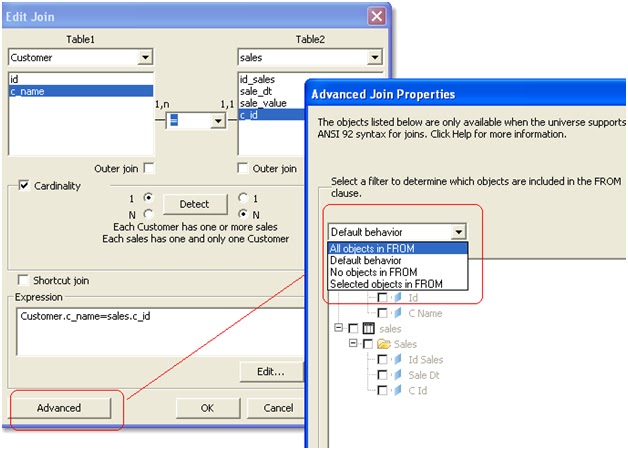
Advance join property in universe is present , when you click a join between any two tables and click on Advance button.
You need to have ANSI92, set to “Yes”, to enable this feature.
So, the question is, what exactly this feature do?
First of all let’s look what is the execution order of  a SQL statement:
When a query is submitted to the database, it is executed in the following order:
FROM clause
WHERE clause
GROUP BY clause
HAVING clause
SELECT clause
ORDER BY clause
So if I use my conditions in FROM Clause instead of WHERE Clause, it will be calculated first and can help in performance improvement.
Take for example in my universe:


If I select c_name object from customer table and sale_value from sales table and use c_name as a filter, the query will be: 


It can be seen that the filter condition is coming in WHERE clause.

The Advanced Join Property allows to the conditions to be used in “FROM” clause.
Again as I said previously, you need to have ANSI92=”Yes”  in your universe parameters for this to work.


Now we will set the advanced join conditions.
Click on the join between the two tables:


The drop down option says it what kind of behavior you want from objects selected in query filter.
Lets say I selected “Selected objects in FROM” in drop down and checked on C Name dimension object.


Now I will create the query again:


See how the filter which was coming in WHERE clause is coming in FROM clause.
I went through number of forums that tells how conditions in FROM clause helps in query performance compared to WHERE clause.
Although both types (i.e. filters in FROM clause and filters in where clause) generate the same results but there are scenarios specially when you use Left Outer joins in your query, that can lead to difference in results, which needs to be taken into consideration while using this option in your universe.


Monday, 19 March 2012

Fan Trap


Fan Trap in Business Objects
This is also a join path problem created in universe when below scenarios are met:
Consider table A, B and C.
  • A   --<   B   --<   C   i.e.  A to B is “One to Many” and B to C is “One to Many”   AND
  • Measures selected from Table B and any kind of object from Table C  AND
  • Table B holds aggregated values from Table C.
This trap can also be created when we are having only two tables say B and C with “One to Many” relationship, where we are using dimension and measure(which is aggregation of a column in C) and an object from C table.
The results will be inflated like Cartesian product.
For eg.
I have three tables


These tables are connected in below manner: 


The relationship is something like this:
A customer say ‘Gaurav’ purchased a car and accessories. He paid total amount(car cost + accessories)=4000.
Now table Sales contain 4000 as the amount and sales detail captures the breakup of that amount i.e.(car=3000 and accessories = 1000). So Sales tables hold aggregated value from sales_detail table.
Classes and objects:


Now I will try to create a webi report using  objects:
Query 1


Id Sales
C Name
Sale Value
213
Gaurav
4,000
Correct result
Query2
Id Sales
C Name
Sale Value
Item Value
213
Gaurav
8,000
4,000
Incorrect result

Adding another object i.e. Item type from table C. 
C Name
Id Sales
Item Type
Item Value
Sale Value
Gaurav
213
Accessories
1,000
4,000
Gaurav
213
car
3,000
4,000
Observe that when we added Item Type to get the detail , item value is properly displayed but sale value still shows two rows with same value and hence when we remove the item_type, it gets aggregated and show 8000, which is a wrong value.
How to resolve this:
Again like Chasm trap you have to create two separate queries to display correct result.
  1. Create two sql statements by checking on the option of “Multiple sql statements for each measure”.
  2. Create alias and context.
  3. Use aggregate awareness to avoid this scenario.

  1. Setting the option in universe parameter:


This will generate 2 sql statements, if measures are selected from 2nd and 3rd table. 


C Name
Item Value
Sale Value
Gaurav
4,000
4,000


This gives correct results. But will not work in case you are selecting only dimension objects and not measure.
  1. Using Aliases and Context.
We will now try to solve the trap using combination of aliases and context.
Create an alias of middle table , in our eg. It is Sales table.


Join Customer with alias table and set cardinalities of the same.
Now we will create two context lets say C1 and C2 like below.

Now we have to take the measure object from sales table i.e. sale_value from the aliased table rather than sales, so repoint the sales value object to point to sale_value column of sales2 table. 


Also check the below option in universe parameters: 


Now, if you use the measure objects from two different context in one query, it will generate multiple sql statements and the results will be correct. 
C Name
Sale Value
Item Value
Gaurav
4,000
4,000


Note:  There is another scenario also where this kind of trap can be created.
Lets say for example, in our structure of universe:


Lets say I ignore Customer table. 


Now If have objects like C_id(dimension Object) , Sale_value(measure) from sales table and item_value from sales_detail table in webi rich client query, it will again create a trap and will show inflated results.

C Id
Sale Value
Item Value
102
8,000
4,000

So it’s showing inflated results again i.e. wrong value of sale value.
To resolve this, we will create alias of sales table, same as above case.


Created two contexts C1 and C2.
Checked the option of ‘Multiple SQL for each contexts’ in universe parameters.
Change the sql of sale value object to point to sale_value column of alias table i.e. sales2.
Now, if you select the objects c_id, sale_value and item_value. It will display correct result.